CROMA PIXEL
Pixel brings the power of a desktop creative suite to any browser tab. Create, edit, and refine anything from quick mockups to production-ready artwork using familiar professional tools.
No account required · Works in Chrome, Safari, Firefox & Edge
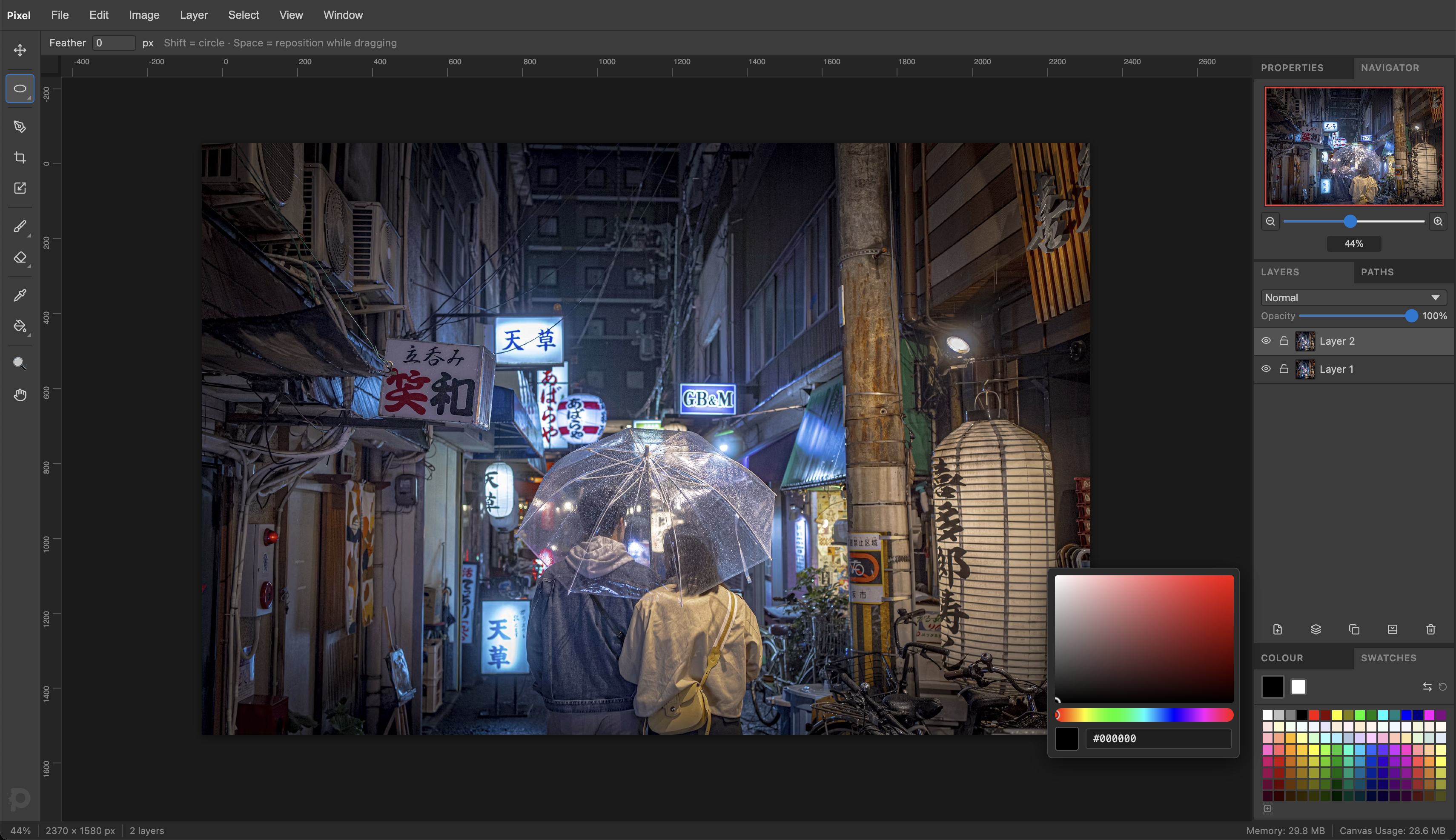
Work with as many layers, blend modes and adjustments as your project needs. Every edit stays flexible until you're ready to export.
Whether you're on your own computer, tablet or phone, Pixel opens instantly in your browser so you can start creating in seconds.
Save every layer, path and adjustment exactly as you left it. Reopen your project weeks later and continue working without missing a thing.
Ideas evolve. Layers let you rearrange, blend, hide, and refine every part of your composition independently, so experimenting never means starting over.
Keep photos, illustrations and effects separate and easy to adjust. Blend them together with familiar modes, organize complex compositions, and use adjustment layers to explore different looks without changing your original pixels.
Whether you're isolating a small detail or an entire subject, Pixel gives you precise selection tools so every adjustment affects exactly the area you intended—and nothing else.
Feather edges, invert masks, and use any selection as a clip region for painting, erasing, gradients, and fills. Your selection travels with every operation until you explicitly dismiss it.
Create smooth paths around any subject, draw perfect curves, or build precise shapes with complete control over every anchor point. When you're ready, turn any path into a selection for painting, masking, filling or retouching.
Convert anchor points from smooth to corner on the fly, break individual handles independently with Alt, and add anchor points anywhere on an existing segment.
From subtle retouching to bold digital artwork, responsive brushes and painting tools make every stroke feel direct and expressive, whether you're using a mouse or a stylus.
Remove unwanted backgrounds, clean up rough edges, fill complex shapes, and blend smooth gradients with tools that help you move from rough ideas to polished artwork quickly and precisely.
Fine-tune color, contrast and mood at any time. Every adjustment remains fully editable, making it easy to compare ideas, revisit decisions, and refine your work as it evolves.
Shape the overall mood of your image with simple controls for light and contrast.
Bring out detail in shadows, midtones and highlights with precise tonal control.
Dial in exactly the look you want, from subtle corrections to dramatic color grading.
Recover images that feel too dark or too bright while preserving natural balance.
Make colors feel richer without overwhelming skin tones or already vivid areas.
Shift colors, mute distractions, or completely transform the palette of your image.
Give shadows, midtones and highlights their own personality for more cinematic color.
Create expressive monochrome images with complete tonal control.
Transform ordinary colors into striking artistic palettes using custom gradients.
Whether you're publishing on the web, sending a proof, or preparing a final asset, Pixel lets you choose the format, quality and size that best fits your project before you export.
Your .pixel file preserves every layer, every path, every adjustment parameter, and every guide exactly as you left them. Reopen any project weeks later and pick up right where you stopped.
The little things matter. Rulers, guides, navigation, transforms, clipboard support and presentation tools are all built in so your workflow stays smooth from beginning to end.
Drag guides from the ruler edges and snap to pixel-perfect positions. Toggle ruler visibility with Ctrl+R.
Thumbnail overview and zoom slider so you always know where you are in large canvases.
Hide all UI chrome and focus entirely on your artwork. Press Tab to toggle in and out instantly.
Resize and rotate any layer with an eight-handle bounding box. Hold Shift to constrain proportions.
Paste any image from the clipboard directly as a new layer. Works with screenshots, photos, and copied content.
Selection and painting tools auto-scroll the canvas when your pointer approaches the edge of the viewport.
Professional tools. Nothing to install. Nothing to pay or subscribe to. Just open Pixel and start creating.
Open Pixel — It's FreeEverything you need to know about Croma Pixel.
Croma Pixel is a professional image editor that runs entirely in your browser. Edit photos, illustrations, graphics, and digital artwork using layers, masks, vector shapes, adjustment layers, AI-powered tools, and advanced editing features without installing desktop software.
Yes. Croma Pixel is free to use. You can start creating immediately with no installation required.
No. Croma Pixel runs directly in your browser. Simply open the application and start editing.
Croma Pixel supports common image formats including PNG, JPEG, WebP, SVG, GIF, BMP, TIFF, ICO, AVIF, and Photoshop (PSD) files, with support for importing and exporting depending on each format's capabilities.
Yes. Croma Pixel includes a professional layer system with folders, masks, blending modes, opacity controls, adjustment layers, layer effects, clipping masks, and non-destructive editing workflows.
Yes. SVG files can be imported, edited, transformed, and exported while remaining fully editable whenever possible.
Yes. Your projects remain yours. Most editing happens locally in your browser. AI features only send data to the provider you choose when you explicitly use them.
Absolutely. Croma Pixel is designed for professional image editing with advanced tools including selections, masks, transformations, adjustment layers, blending modes, filters, vector editing, typography, and export options suitable for production workflows.
Croma Pixel works best in the latest versions of Chrome, Edge, Safari, and Firefox. For the best performance and compatibility, keep your browser up to date.